
 Portfolio Group
  Portfolio HR & Reward
  Portfolio Credit Control
  Portfolio Procurement
  Portfolio Payroll Canada
All you need to know about temping with Portfolio Payroll
Temping, Contracting, Interim – these are all terms used to describe an increasingly popular employment option for professionals who want flexibility and variety in their work, alongside offering businesses experts to cover busy periods, implement projects, and bridge the gap between permanent hires.
Temping through Portfolio Payroll gives you access to a wide range of opportunities across sectors. Our continued experience in the market will allows you to experience new working environments, develop existing skills, enhance your CV, follow your professionals goals and ensure you get paid on time.

Complete a timesheet
Our timesheets are now submitted via our online portal.
The deadline for timesheets is Monday 10am, failure to submit your timesheet by this time will result in non-payment.
If you have any enquiries or comments regarding your timesheet / wages, please email us.
What’s needed
- Proof of eligibility for employment in the UK
- NI number
- Bank details – account name, bank name, sort code (6 digits) and account number (8 digits)
- We may also require a roll number if you bank with certain Building Societies
- P45/P46 – We require the original copies of the last two sheets of your most recent P45. If you do not have a P45, or it is dated before 6 April, we will need a P46
Key guidelines
On commencing an assignment with Portfolio Payroll, please adhere to the following guidelines. These are in place to ensure that your booking runs as smoothly as possible and continues for as long as possible. They also help towards your future references and continued work via Portfolio.

- Always inform your consultant at Portfolio Payroll before 9am if you are sick and unable to go to work.
- If holidays are booked, ensure that you telephone in advance with the dates you are going away, even if it’s only one day.
- Holiday pay has to be requested with your consultant and on your timesheet it will not be automatically paid when “holiday” is put on the timesheet.
- Make sure you complete your timesheet every Friday and email it to wages@portfoliopayroll.com. Remember if a timesheet is not received by 10am on Monday it may lead to a delay in payment.
- If you are employed on a full time basis, you must work a minimum of 35 hours, fewer hours could jeopardise your assignment and means less money in your bank accounts. If you have permanent interviews these must be held outside of office hours, before 9am or after 5pm.
- Always arrive at your assignment promptly. As a temporary worker you should have the attitude of a permanent member of staff.
- Always ensure that your mobile phone is turned off while at work and do not use company resources for personal reasons. No personal phone calls and no internet access.
- If your assignment is coming to an end, let your Consultant at Portfolio Payroll know as soon as possible so that we can start to look for a fresh assignment for you.
- Dress appropriately for the environment you are working in. Remember it is always better to overdress. Create a good image.
- Never terminate an assignment without discussing it with your consultant. Remember, you are employed by Portfolio Payroll and as such have an obligation to inform us of any changes during your assignment.
Frequently asked questions
What is the deadline for submitting a timesheet?
Timesheets should be submitted on Fridays at the end of your work week and latest by 10am Monday to ensure payment. For queries, please call Michaela or Ellie on 020 7650 3192 or email: wages@portfoliopayroll.com.
Bank Holidays are the only exception to this deadline. Separate reminders will be emailed out to detail bank holiday deadlines.
When will I get paid?
Payment is sent on the Friday after the timesheet is submitted, provided that they are approved by your authoriser before Tuesdays 12:00.
How do I upload and submit a timesheet?
Please see the below step by step process of how to upload and submit a timesheet.
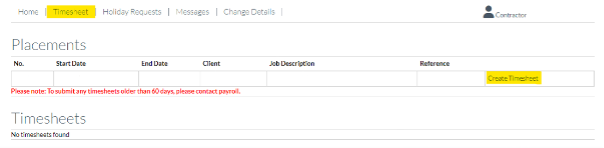
- Once you have created your account you will then see the home page – press ‘timesheet’ and then ‘create timesheet’ this will be on the far right of the page.
- If you are on a daily rate, please make sure to input your values as 1 (for a day’s work).
If you are on an hourly rate, please input values based on how any hours were worked.Look at the start and end date of the timesheet you are submitting so that you are always inputting for the right week worked.When submitting timesheet please be aware that timesheets are for worked values ONLY, which means that if you are requesting holiday, do not input any value into the timesheet for the holiday date – Please leave blank. (Separate instructions on holiday requests below)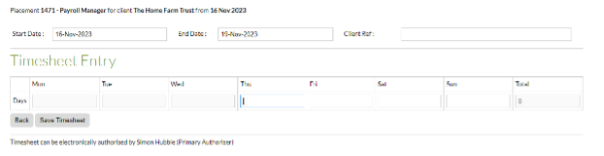
- Once you have inputted your worked values, please press ‘save timesheet’.
- You will then see these options after pressing save – you will then need to press ‘Lock timesheet & submit for approval’ this is very important as if you do not press this button, your authorizer will not be able to approve the timesheet.

- Your timesheet should show ‘Submitted For Approval’ – once approved by your authorizer it will show as ‘Authorised Online’ or ‘Processing’.

Below is what approved timesheets should look like.

How do I request holiday?
Please be aware that when submitting holiday requests, you will need to email us on wages at wages@portfoliopayroll.com before Tuesdays at 10am each week to ensure process and payment, any holiday request put through the portal (EEZYTIME) will not be actioned.
Bank Holidays will be the only exception to this deadline.
If you work in hours and not days, we need you to include the number of hours you would like as holiday along with the date of the holiday.
Bank holidays are not automatically paid out, if you would like bank holidays paid – they will need to be requested like any other holiday request.
Full holiday accruals can only be paid out at the end of your placement, you will be P45’d on your final pay week, and the request has to be emailed to wages@portfoliopayroll.com as it WILL NOT be automatically paid out – an email request has to be made – as any other Holiday requests before Tuesdays at 10am.
Please note that we cannot pay holidays if you are working your regular hours/days on the dates that holiday was requested.
How can I see my holiday accrual?
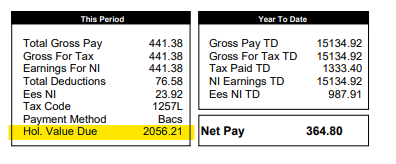
You will be able to see your holiday accrual at the bottom of your payslip – we cannot pay out anymore then what you have accrued.
How do I change my bank details or home address?
If you have changes in bank details or a home address, please submit this through the ‘Change Details’ option in the portal

How do I get my Payslip?
Payslips are emailed out to you every Wednesday and are Password Protected. The Password is your N/I number and is case sensitive with no gaps.
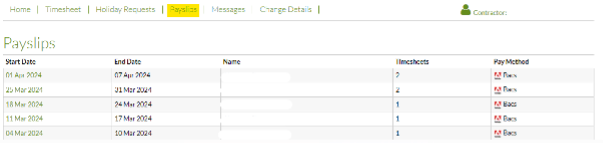
You will also be able to access and download your Payslips on the portal the following Monday after payment.
Get in touch
Latest jobs

Portfolio Payroll is supporting a reputable accountancy practice in Leeds who are looking to appoint an experienced Tax Advisor to join their growing team. This role suits someone confident in managing a mixed tax portfolio, delivering accurate co...
View job & applyPayroll Assistant 18 hours Per Week £15 PH Full time equivalent of £36k Monthly Payroll of 2200 employees System they use is PBS Days in the office are optional normally Monday, Tuesday, Wednesday Working knowledge of UK tax and NI calculations, s...
View job & applyPayroll Administrator Temp till find perm replacement Salary £32,000 – £35,000 Payroll Administrator £17-£20PH Part time 3 days a week Sole role 200 people on the monthly payroll Start ASAP 3 days in office in London 51367SB INDTEMP The Port...
View job & applyPortfolio Payroll are thrilled to be supporting our client based in the heart of Leeds to recruit an experienced Payroll & Pensions Manager to join their existing team team, we are looking for an experienced Payroll & Pensions Manager R...
View job & applyOur client, a well-established and highly respected name within the retail industry, is seeking a Payroll & Accounts Administrator to join their finance team. This role will be part time (3 days per week) with the requirement to work full time...
View job & applyBusiness Development Manager – Manchester Up to £35,000 basic + OTE £100,000+ per year 8:45AM – 5:30PM Monday to Friday OTE Year 1 – Up to £100,000 / OTE Year 2 – Up to £150,000 / OTE Year 3 – £250,000 Additional £5,0...
View job & applyPayroll Manager City of London 9 Months Plus Fixed term contract £65,000 – £80,000 Portfolio Payroll is delighted to be partnering with a Global Financial services firm based in the City of London. They are seeking a Payroll Manager on a 9 m...
View job & applyPayroll Accountant City of London 6-8 Months Fixed term contract £65,000 – £70,000 Portfolio Payroll is delighted to be partnering with a Global Financial services firm based in the City of London. They are seeking a Payroll Accountant on a ...
View job & applyPayroll Administrator | Location: London | Hybrid: Only 2 days a month onsite An established outsourcing and business services organisation are seeking a Payroll Administrator to join its dedicated public sector division. This role offers the oppo...
View job & applyPayroll Administrator | Location: London | Hybrid: Only 2 days a month onsite An established outsourcing and business services organisation are seeking a Payroll Administrator to join its dedicated public sector division. This role offers the oppo...
View job & apply